Opens in a browser
Send a link. Clients, contractors and stakeholders explore the space on a laptop or phone without installing anything or learning a viewer.
For survey & reality capture teams
Upload the E57 your scanner already produces. Get back a photoreal 3D Gaussian Splat scene that opens in a browser — no plugin, no workstation and no training for your client. Share it with a link.
Product demo
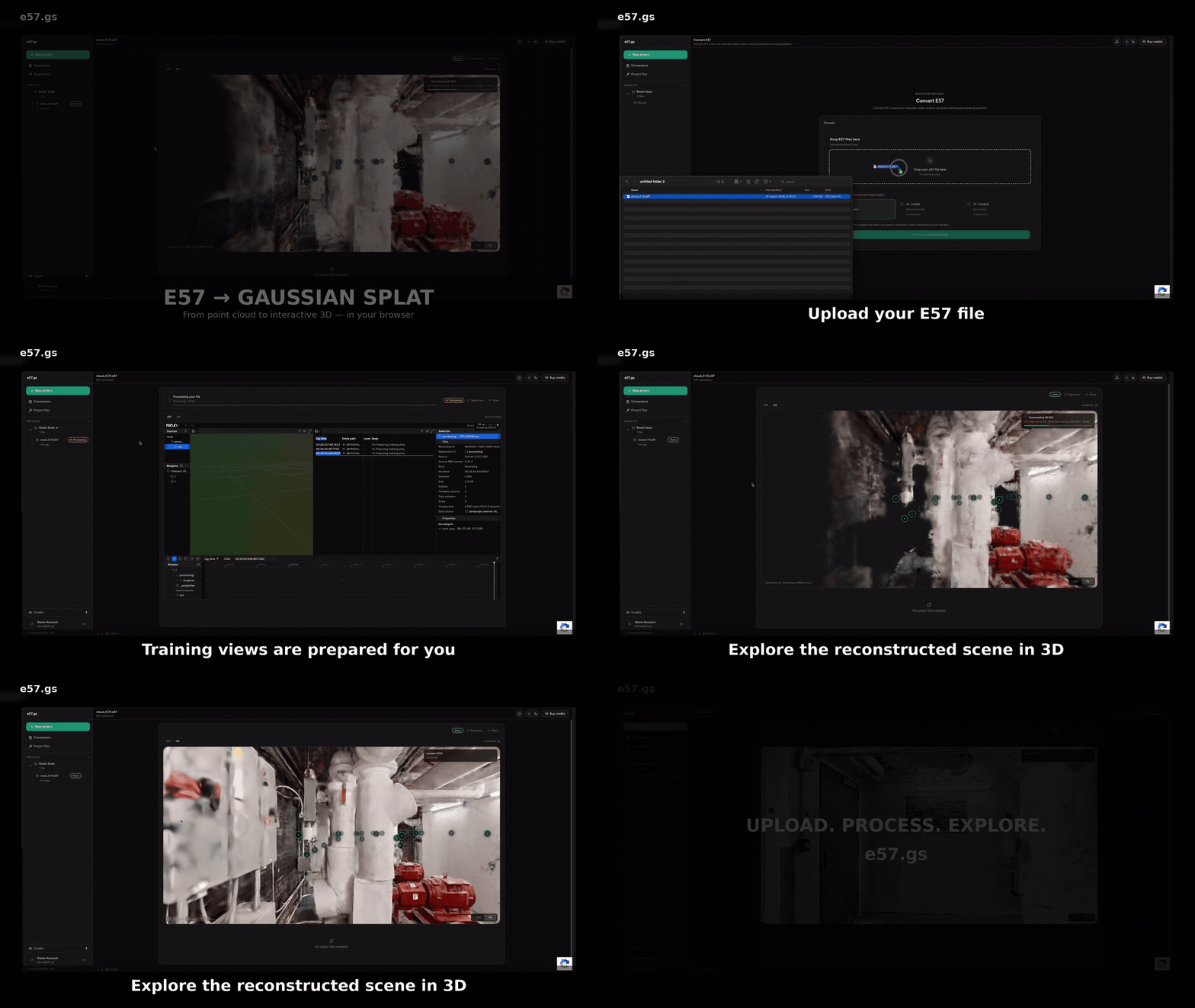
Upload your scan, follow its progress, inspect the completed scene in the browser and download the result from the same workspace.
What you get
A point cloud is a working file. This is the same capture reconstructed as a scene anyone can open and understand — the surfaces, the light and the materials.
Send a link. Clients, contractors and stakeholders explore the space on a laptop or phone without installing anything or learning a viewer.
The scene starts from the scanner’s aligned geometry while compatible imagery and station poses drive full 3DGS optimization — not an artist’s impression.
Most jobs finish inside the hour. Upload after a site visit and share the result before the report is written.
How it works
Straight from the scanner or your processing software. One file, one upload — no manual cleanup pass before the service can inspect it.
Compatible observations run through 30,000 optimization iterations on a cloud GPU, with adaptive densification, pruning and degree-3 spherical harmonics.
Open the result in your browser, check it and send it on. Anyone with the link can look around without an account.
Your files
Most terrestrial scans exported with imagery already qualify. If yours does not, the upload tells you what is missing before you spend a credit.
Aligned geometry. Scans combined into one coordinate system by the software used after capture.
Imagery from the scanner. Panoramic or per-station photos captured alongside the geometry.
Station positions. Where the instrument stood for each setup, normally written into the E57 automatically.
Output inspection
Use the browser preview to examine appearance between viewpoints, then download the Gaussian PLY and inspect the attributes written by the converter.
A full degree-3 schema contains 45 f_rest_* coefficients beyond the base color. The file exposes them for independent inspection.
Orbit a glossy floor, window or polished surface and check whether highlights respond naturally as the camera moves.
The trained Gaussian count can differ from the input point count because optimization adds useful detail and removes low-value primitives.
Missing views, glass, mirrors, moving objects, poor registration and sparse imagery can still create gaps or artifacts. Every result should be reviewed.
Related workflows
Review when color, camera poses and point-cloud initialization are sufficient. Read the guide →
Compare LiDAR measurements with a rendered Gaussian scene and understand practical quality limits. Review requirements →
Convert a Matterport Pro3 E57 export into a browser-ready Gaussian Splat. Convert Matterport E57 →
Request geometry-focused reconstruction for CAD review, visualization or printing. Explore mesh workflows →
Pricing
No subscription, no seat licences and no minimum. Credits do not expire.
$15
$49.50
$200
Files and privacy
Uploads, intermediate data and outputs follow the retention limits shown in the service. Keep your own source and output copies. Public or share links can be opened by anyone who has the link. See the Privacy Policy →
Questions
The automated E57 to Gaussian Splat converter accepts .e57 files. Full training depends on how the E57 is structured and whether it contains aligned point geometry, compatible scanner imagery and station poses.
It is an online E57 to Gaussian Splat converter whose full-training path runs 3D Gaussian Splatting optimization. It does more than map each input point to one fixed-color Gaussian: compatible scanner imagery and poses provide observed views for novel view synthesis.
After a successful conversion, inspect the downloaded Gaussian PLY header. A degree-3 result contains 45 f_rest_* properties in addition to the base color coefficients. This confirms the expected field structure, but not optimization by itself. You can also orbit reflective or glossy areas in the browser and look for appearance that changes with the viewpoint.
Geometry and per-point RGB can still produce a viewer-ready geometry-based splat, but fixed appearance is not the same as full novel-view training. It cannot recreate reflections, hidden surfaces or photographic observations that were never captured.
Successful jobs expose the Gaussian Splat assets produced by the converter, commonly PLY and/or SPLAT depending on the completed result. The Gaussian PLY can preserve optimized appearance attributes for compatible tools.
PLY is a flexible container that can store point or Gaussian attributes and is useful for compatible editing and interchange tools. SPLAT is a compact viewer-oriented representation; feature support varies by viewer.
Yes. One credit is required to start an E57 conversion. It is charged only after a successful conversion, and failed conversions are not charged.
Direct point remapping is mainly bounded by file parsing and disk I/O. Full 3DGS training runs iterative GPU optimization, adaptive densification and pruning. A typical full-training job takes about 12–40 minutes, depending on the source data and available compute.
e57.gs is not permanent archival storage. Retention follows the limits shown in the service and operational requirements, so keep your own copies of source files and outputs.
Create an account, upload one scan and see the result before you decide anything.
Create an account